
Last month a relative forwarded me a “breaking news” screenshot about a bank freezing all savings accounts by the weekend. It had a logo, a headline, even a fake reporter name. It was also completely invented. Within an hour it had reached three family groups. This is exactly why learning to judge the reliability of online information has become a basic life skill, not a niche talent for journalists.
The internet gives us more knowledge than any library in history, but it also gives everyone a printing press. Rumours, scams, edited photos and AI-written pages look just as polished as real reporting. The good news is that you do not need special software or a degree to tell them apart. You need a short routine you can run in under two minutes. This guide walks you through that routine, step by step, with free tools and real examples.
In this article
- Why the Reliability of Online Information Matters More Than Ever
- Step 1: Pause Before You React
- Step 2: Investigate the Source Using the SIFT Method
- Step 3: Read Laterally, Not Vertically
- Step 4: Trace the Claim Back to Its Original Source
- Step 5: Check the Date, the Place and the Context
- Step 6: Judge the Evidence, Not Just the Confidence
- Step 7: Verify Images, Videos and AI-Generated Content
- A Worked Example: Checking a Viral Post in Two Minutes
- A Quick Credibility Scorecard You Can Use Today
- Free Fact-Checking Tools Worth Bookmarking
- Build Habits That Make Checking Automatic
- Frequently Asked Questions
- Final Thoughts
Why the Reliability of Online Information Matters More Than Ever
A few years ago, a badly designed website was a decent warning sign. Today anyone can launch a professional-looking page in an afternoon, and generative AI can produce thousands of convincing articles for almost nothing. Design quality no longer tells you much about truth.
Three things make the problem harder than it used to be:
- Speed beats accuracy. Social platforms reward posts that get reactions quickly. Shocking claims spread faster than careful corrections.
- Context gets stripped away. A real photo from 2015 can be reposted as “yesterday’s protest”. The image is genuine; the claim attached to it is not.
- Private messaging hides the source. A forward on WhatsApp or Telegram arrives without a link, a date or an author, so there is nothing to check unless you go looking.
The cost is not abstract. People lose money to fake investment pages, skip proper medical care because of a viral “cure”, and share rumours that hurt real individuals. Checking before you trust, and especially before you share, protects you and everyone in your contacts list.
Step 1: Pause Before You React
Misinformation is designed to trigger a feeling first and a thought second. Anger, fear, outrage and excitement all push us to share immediately. So the very first step is not a technical one. It is a pause.
When something online makes your heart rate jump, ask yourself two questions: Who benefits if I believe this? and What would I need to see to be convinced it is true? That tiny delay is surprisingly powerful. Researchers who study digital literacy keep finding that people who slow down make noticeably better judgments than people who go with their first reaction.
Step 2: Investigate the Source Using the SIFT Method
One of the most practical frameworks for checking online claims is SIFT, developed by digital literacy educator Mike Caulfield. It stands for four moves: Stop, Investigate the source, Find better coverage, and Trace claims, quotes and media back to the original context. We have already covered the first move, so let us look at the second.
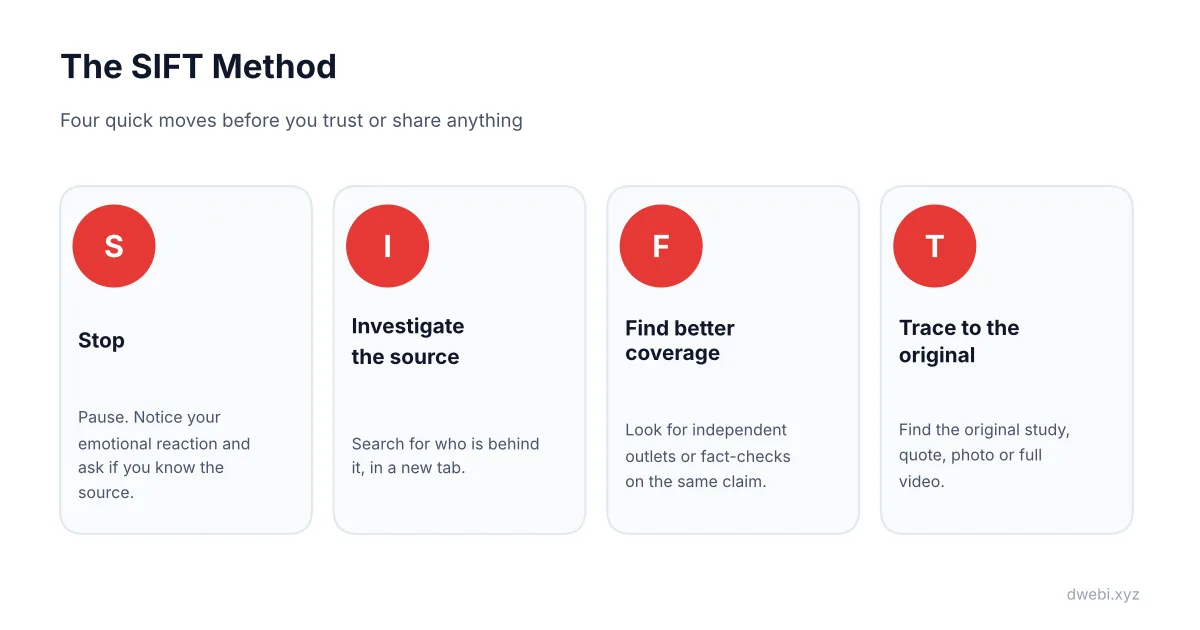
Investigating the source does not mean reading the website’s own “About” page. Of course a shady site will describe itself as trustworthy. It means asking what other people say about it. Open a new tab, search for the name of the outlet or author, and see what comes up. Is there a neutral description, such as an encyclopaedia entry? Has the site been caught publishing false stories? Does the author exist outside this one website?
A quick check on the web address helps too. Look-alike domains are common: a fake news page might use a name that is one letter away from a real publication, or end in an unusual extension to appear official. If the address looks slightly off, treat it as untrusted until proven otherwise.
Step 3: Read Laterally, Not Vertically
Most people evaluate a page by staring at it: scrolling up and down, studying the design, reading the claims. Professional fact-checkers do the opposite. They leave the page almost immediately and open new tabs to see what the rest of the web says. This habit is called lateral reading, and studies of how fact-checkers work have shown it is faster and more accurate than reading deeply on the original page.
Here is a simple way to practise it:
- Copy the name of the organisation or the key claim.
- Open a new tab and search for it, adding words like “review”, “fact check” or “controversy”.
- Look at three independent results. Do they agree? Are they from different organisations rather than one story copied everywhere?
- Return to the original page only if the outside picture looks reasonable.
Two minutes of this will catch most fake shops, invented experts and “miracle” product pages.
Step 4: Trace the Claim Back to Its Original Source
Many articles are built on a chain: a blog quotes a news site, which quotes a press release, which summarises a study. Every link in that chain can distort the message. If a headline says “scientists prove that coffee cures X”, find the actual study. Does it say “proves”, or does it say “is associated with” in a small sample?
Good writers link directly to their sources. When there are no links at all, or the links only lead to the same website, be cautious. When a quote is attributed to a famous person, search for the exact wording in quotation marks. Fake quotes are everywhere, and they usually collapse after one search.
If a claim is important enough to share, it is important enough to spend sixty seconds finding where it came from.
Step 5: Check the Date, the Place and the Context
Old stories get recycled constantly, particularly during emergencies, elections and natural disasters. Before you trust anything, confirm when it was published and whether the details still apply.
- Look for a publication date and an updated date on articles.
- For screenshots, search for the headline to find the original page.
- For health, tax, legal or financial advice, check that it applies to your country. Rules differ widely between regions, and last year’s rule may have changed.
The Wayback Machine at the Internet Archive is a useful tool here. It stores snapshots of web pages over time, which lets you see whether a page was quietly edited or whether a claim really appeared when someone says it did.
Step 6: Judge the Evidence, Not Just the Confidence
Confident writing is not the same as accurate writing. Reliable pieces show their evidence and are honest about uncertainty. Unreliable ones lean on emotion, absolute words and vague authority.
Questions to ask about statistics and studies
- How big was the sample? A survey of 40 people cannot describe a whole country.
- Who paid for it? Funding does not automatically invalidate research, but it is worth knowing.
- Is a percentage hiding a tiny number? “Risk doubled” can mean going from one in a million to two in a million.
- Was it peer-reviewed or just posted online? A preprint is not worthless, but it has not been checked by independent experts yet.
Watch for the usual red flags
Be careful when a page uses words such as “they don’t want you to know”, “100% guaranteed” or “doctors hate this”. Be equally careful with anonymous experts (“a top scientist said”) and with websites that exist mainly to sell you something at the end of the article. None of these prove a claim is false, but together they should raise your guard.
Step 7: Verify Images, Videos and AI-Generated Content
Photos and clips feel like proof, which is exactly why they are used so often to mislead. The most common trick is not a sophisticated fake. It is a real image placed in a false context.
How to check a suspicious image
- Run a reverse image search with TinEye or Google Lens to find earlier uses of the same picture.
- Look for the oldest appearance. If a “current” photo appeared years ago, the claim is false.
- Zoom in for odd details: warped text, extra fingers, melted backgrounds and mismatched shadows are typical of AI-generated pictures.
- For video, search for key frames or check whether reputable outlets are reporting the same event.
Technology is also starting to help on the provenance side. The Coalition for Content Provenance and Authenticity (C2PA) develops an open standard that attaches verifiable “content credentials” to images and video, showing how a file was created and edited. These labels are not on every file yet, but their presence is a good sign and their absence is not, by itself, a bad one.
A final caution about AI detectors: tools that claim to spot AI-written text or images are unreliable. They produce both false positives and false negatives, so use them as one weak signal at most. Source-checking still works better than any detector.

A Worked Example: Checking a Viral Post in Two Minutes
Let us apply everything to the fake bank screenshot from the beginning. Here is how the check actually went.
- Pause (10 seconds). The message was urgent and scary, so I treated that as a warning sign instead of a reason to hurry.
- Investigate the source (30 seconds). The screenshot showed no link, and the “news site” name returned no results anywhere except in other forwards of the same image.
- Read laterally (40 seconds). I searched for the bank’s name plus “freeze accounts”. The bank’s official website and two established news outlets had nothing, and one fact-checking page had already flagged the rumour.
- Check the context (20 seconds). The wording matched an older hoax that had circulated in another country years earlier, only with the bank’s name swapped.
Total time: a little over a hundred seconds. The result: a clear answer and a polite reply to my relative with the fact-check link attached. That is what good judgment about the reliability of online information looks like in practice. It is not complicated, it is just a habit.
Mistakes people make when they fact-check
- Trusting the first search result. Search rankings reflect popularity and optimisation, not accuracy. Compare several sources.
- Checking only the claims they doubt. We scrutinise what we dislike and wave through what we like. Apply the same standard to both.
- Treating a correction as proof of bias. A fact-checker can make an error, but the way to test that is to read their evidence, not to dismiss them.
- Stopping at the headline. Headlines are written to attract clicks. The body of the article often says something much more cautious.
A Quick Credibility Scorecard You Can Use Today
When you do not have time for the full routine, run through this table. If you cannot answer “yes” to most of these, hold off on sharing.
| Check | What to look for | Time needed |
|---|---|---|
| Author and outlet | Named author, real organisation, contact details | 30 seconds |
| Independent confirmation | At least two unrelated sources reporting the same facts | 60 seconds |
| Original source | Direct link to the study, document or full video | 60 seconds |
| Date and context | Recent, with details that match the claim | 20 seconds |
| Tone | Balanced wording rather than panic, outrage or hype | 10 seconds |
| Images and video | Reverse search shows no earlier, different use | 45 seconds |
Free Fact-Checking Tools Worth Bookmarking
You do not need to pay for any of these. A small toolkit saves a lot of time:
- Snopes and FactCheck.org for viral claims, rumours and political statements.
- TinEye and Google Lens for reverse image search.
- The Wayback Machine for checking older versions of a page.
- The International Fact-Checking Network directory to find signatories who follow a public code of principles.
- Your own country’s fact-checking organisations, which understand local context far better than global sites.
Build Habits That Make Checking Automatic
Nobody has the energy to investigate every post, and that is fine. The goal is to decide which claims deserve your effort. A sensible rule is to check anything you plan to share, anything that affects your money or health, and anything that makes you unusually angry or afraid.
A few habits help the whole family:
- Agree on a household rule: nothing gets forwarded to a group chat until someone has searched for it.
- When you correct a relative, do it privately and kindly, and send the link that shows the original. Public embarrassment makes people defend false claims harder.
- Follow a mix of sources, including ones that sometimes disagree with you. A feed that only confirms your opinions is the easiest to manipulate.
- Keep your own accounts secure, because hacked profiles are a major route for scams and false stories. Our guide on how to protect your online accounts covers the basics.
If you use AI chatbots for research, treat their answers as a starting point. They can sound certain while being wrong, and they sometimes invent sources. Always open the cited source yourself, and if you want to understand why this happens, our data science vs artificial intelligence guide explains how these systems actually work.
Frequently Asked Questions
What is the fastest way to check whether a website is reliable?
Leave the site and search for its name in a new tab. Look for neutral descriptions, a named author, a physical or corporate identity and coverage by independent outlets. This lateral reading approach takes about a minute and is more reliable than judging a site by its appearance.
Are .org and .edu websites always trustworthy?
No. Anyone can register a .org domain, and student or staff pages on .edu sites are not official statements from the institution. Judge the specific author and evidence rather than the domain ending.
How can I tell if a photo has been edited or taken out of context?
Run a reverse image search to find the earliest copy and compare it with the claim being made. Then look for visual inconsistencies in shadows, text and fine details. Context errors are far more common than technical edits.
Is Wikipedia a reliable source?
It is a good place to start, particularly for finding the references at the bottom of an article. For anything important, follow those references to the original source instead of citing the article itself.
Final Thoughts
Improving the reliability of online information you consume does not require paranoia. It requires a small, repeatable routine: pause, check the source, read sideways, trace the claim, confirm the date and context, weigh the evidence and verify the media. Practise it a few times and it becomes second nature, almost like looking both ways before crossing a road.
Start with one habit this week: before you share anything surprising, open a new tab and search for it. That single step would have stopped my relative’s fake bank notice before it reached the first group chat, and it will protect your own circle too.


Leave a Reply